Typing Guide: Master the Keyboard
1. Proper Posture
Good posture is the foundation of comfortable and efficient typing. It helps prevent strain and fatigue.
- Sit up straight with your back against your chair.
- Keep your feet flat on the floor.
- Position your screen at or slightly below eye level.
- Your wrists should be straight, and your fingers should curve naturally over the keys.
- Keep your elbows at a 90-degree angle.
2. Hand Positioning: The Home Row
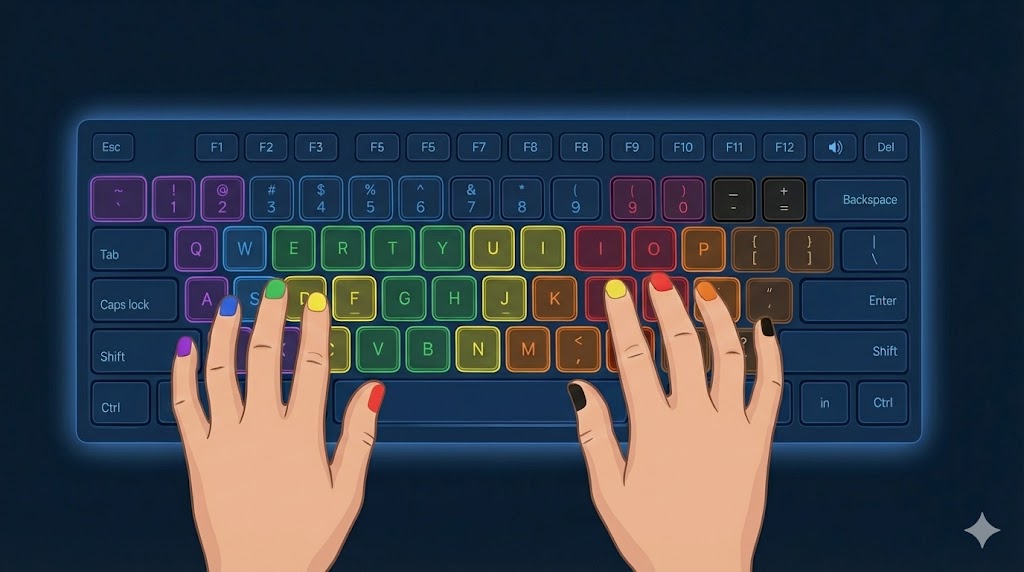
The "home row" is the resting position for your fingers. This technique, called touch typing, allows you to type without looking at the keyboard.
- Left Hand: Place your fingers on the A, S, D, and F keys.
- Right Hand: Place your fingers on the J, K, L, and ; (semicolon) keys.
- Your thumbs should rest lightly on the spacebar.
- Notice the small bumps on the F and J keys? They help you find the home row without looking.
3. Practice Smart
Consistency is more important than intensity. Short, regular practice sessions are more effective than long, infrequent ones.
- Focus on Accuracy First: Speed will come naturally as your accuracy improves. Don't rush.
- Don't Look Down: Resist the urge to look at your keyboard. Trust your muscle memory.
- Use HyperDrive's Insights: The personalized advice in your report will help you target your specific weaknesses.
- Stay Relaxed: Keep your hands and wrists relaxed. Tensing up leads to errors and fatigue.
.png)
After each test, HyperDrive provides a detailed analysis of your performance. Here's what each metric means:
Typing Rank
Your rank is a summary of your skill level based on WPM and accuracy, giving you a sense of where you stand (e.g., 'Good', 'Excellent', 'Master'). An accuracy below 92% will always result in a 'Needs Practice' rank, as accuracy is the foundation of good typing.
Performance Archetype
The archetype analyzes your typing style. Are you a 'Surgeon' with perfect accuracy, or a 'Sprinter' who types in bursts? Archetypes like 'The Meticulous' (many corrections) or 'The Gambler' (low accuracy, no corrections) help you understand your patterns of focus and endurance.
Corrected Errors
This is the total number of times you used the Backspace key to fix a mistake. A high number here can significantly impact your rhythm and final WPM, even if your final accuracy is high.
The diagnostics section gives you specific data to work on.
Problem Keys
This shows you which keys you miss most often. It's based on the key you were *supposed* to press, helping you identify your most common mistakes and the finger movements that need practice.
Slowest Keys
This shows the keys that have the highest *average* press time. These are correct keystrokes that consistently slow you down. Practicing words and combinations with these keys can significantly boost your overall speed.
Rhythm and Jitter measure the consistency of your keystroke timing. A high Rhythm score and low Jitter score mean you type with a steady, even tempo. Pace Analysis breaks this down further:
Insight: The prescriptive advice in this section tells you *why* your performance is what it is. If your Jitter is low but your 'Corrected Errors' are high, it means self-correction is sabotaging your otherwise excellent flow. If your Jitter is high, your entire flow is erratic and needs focus on smooth, steady pacing.